 PreGuru
PRESENTATION, ORCHESTRATED.
手元でプレゼンテーションをコントロールPresentation control, right at hand.
世界中のビジネスマンの“成功”を支援するApple Watch / iPhone アプリThe Apple Watch and iPhone app behind successful presenters worldwide.
PreGuruは、プレゼンのリモコンではありません。プレゼンの設計と、聴衆が魅了される瞬間。その間に欠けていたレイヤーです。PreGuru is not a presentation remote.PreGuru is the missing layer between presentation design and audience enchantment.
PreGuruと手首に装着したApple Watchがプレゼンテーションの時間も、スライド送りも、録音もオーケストレーション。PreGuru and the Apple Watch on your wrist orchestrate your presentation’s timing, slides, and recording.
エアスワイプは、構えが整った瞬間にApple Watchが2回振動して知らせます。その合図に合わせて振る——覚えるのは、それだけ。Apple Watchの制約を隠さずに設計したから、本番で裏切りません。Air Swipe tells you when it is listening: two taps on your wrist the moment your posture is right. Flick on that cue — that is all there is to learn. We designed around the Apple Watch’s real limits instead of hiding them, so it holds up on the day.


iPhone / Apple Watchアプリ:2026年10月6日 公開予定 — 発売記念 ¥980(買い切り)iPhone / Apple Watch app: 6 October 2026 — introductory $7.99, one-time purchaseiPhone / Apple Watchアプリ:App Storeで販売中(買い切り)iPhone / Apple Watch app: on the App Store (one-time purchase)


いつものプレゼンテーションアプリで使える。WORKS WITH YOUR PRESENTATION APPS.
矢印キーでスライドを送れるプレゼンソフトに対応。iPhoneとMac / Windows用の無料Receiverが必要です。プレゼン画面を最前面にしてお使いください。Works with presentation software that accepts arrow-key navigation. Requires iPhone and the free Mac / Windows Receiver. Keep your presentation in the foreground.
SEE IT WORK
腕を振るだけで、スライドが送られます。 Just swing your arm. The slide advances.
実際の動作です。クリッカーは握っていません。手元も演台も見ずに、話しながら送れます。 This is the real thing. No clicker in hand. Keep talking, keep your eyes on the room.
※ 時計の面を自分に向けて立て気味に構えてください。面が水平だと反応しません。振ってよいタイミングは、上がる振動が2回で知らせます。 Hold the watch face toward you, fairly upright — a flat face will not register. Two rising taps on your wrist tell you when a flick will land.
KEEP IT AWAKE
眠らせない設定と、眠ったときの1回タップ。 Keep it awake. And one tap when it sleeps.
Apple Watch は、画面に触れてから70秒は起きています。本番前の3つの設定で眠りにくくし、それでも手首に「下がる振動」が来たら、文字盤を指で軽く1回「トン」。それだけで次の70秒も振れます。1回では表示は変わりません(経過/残りの切り替えは2回、エアスワイプのON/OFFは3回)。 The Apple Watch stays awake for 70 seconds after you touch the screen. Three settings before the talk make it harder to fall asleep; if you still feel the falling buzz on your wrist, tap the face lightly once. That alone gives you the next 70 seconds. A single tap never changes the display (double tap switches elapsed/remaining; triple tap toggles Air Swipe).
図解アニメ・無音・約30秒。設定の手順は「はじめかたガイド」の本番前の推奨設定にあります。 Illustrated, silent, about 30 seconds. Step-by-step settings are under Recommended settings before your talk.
EXPLORE BY DEVICE
プレゼンを成功させるためのデバイス連携。Devices working together for a successful presentation.
下のタブを選ぶと、それぞれの機能と使い方に切り替わります。Select a tab below to see its features and how it works.
01 / APPLE WATCH ORCHESTRATION
プレゼンを手元から指揮(オーケストレーション)する。Orchestrate your presentation from your wrist.
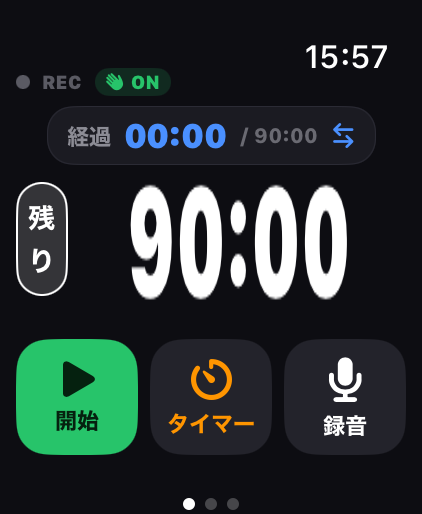
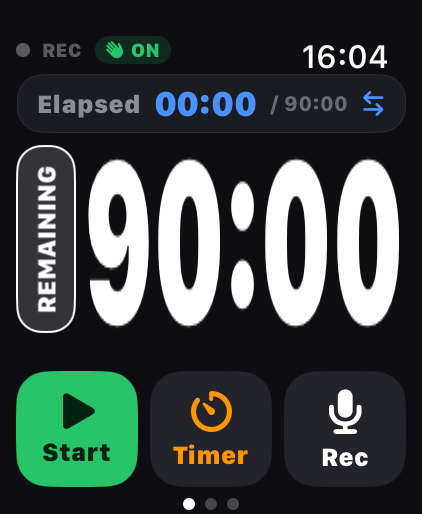
01 / 時間・タイマー・録音Timing, timer & recording
01 / YOUR WRIST, IN CONTROL
話す、時間を読む、ワークを行う。すべて手元から。Speak, read the clock, run the workshop. All from your wrist.
持ち時間も、ワークの進行も、録音も。Apple Watchの01画面が、登壇の流れをまとめて支えます。Talk timing, workshop pacing, and recording. Screen 01 brings your presentation controls together on Apple Watch.
経過・残り時間をひと目でElapsed and remaining time
経過と残りを切り替え、開始・一時停止。色や振動の合図で、締めくくるタイミングをつかめます。Switch between elapsed and remaining time, start or pause, and use color and haptic cues to time your closing words.
演習も休憩も、独立タイマーでA separate workshop timer
プレゼンの持ち時間とは別に、ワークや休憩のカウントダウンを操作できます。Run a countdown for exercises and breaks, independently of your talk time.
録音のON/OFFも、手元からRecording, from your wrist
Watchから録音を開始・停止。音声は接続したiPhoneで録音・保存されます。Start and stop from Watch. Your connected iPhone records and saves the audio.
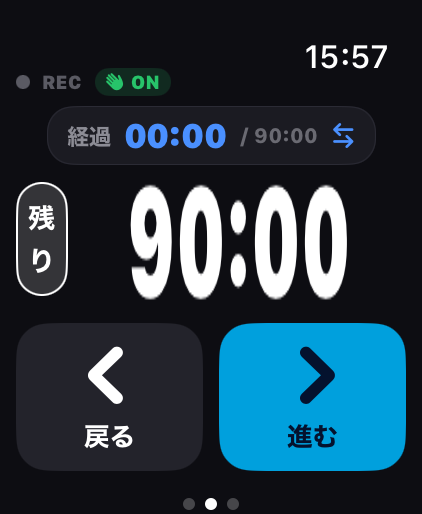
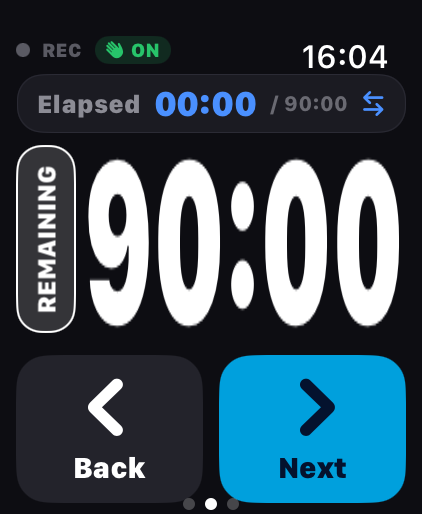
02 / スライド・ジェスチャーSlides & gestures
02 / AIR SWIPE, WITH LEARNING
タップでも、ひと振りでも。物語を、思いのままに。Tap or Air Swipe. Keep your story moving.
画面のボタンで確かに送る。手首のジェスチャーで、聴衆から目を離さず進める。場面に合わせて選べます。Use the on-screen buttons for a deliberate move, or a wrist gesture to keep your eyes on the audience. Choose what suits the moment.
大きなボタンで、送り・戻しOn-screen next and back
Apple Watchのクリッカー画面から、スライドを次へ・前へ操作できます。Move forward or back from the clicker screen on Apple Watch.
学習機能付きジェスチャーでスライド送りGesture slide control that learns
Apple Watchを装着した手の振りでスライドが送れます。ジェスチャーは校正機能や、AI学習機能(送り直後の取り消しで学習)でユーザーの振り方を学び誤発動を抑えます。Advance slides with a wave of the hand wearing Apple Watch. Calibration and AI learning (from undo right after an advance) learn your motion and suppress misfires.
話すとき・送るときを切り替えArm when you need it
ダブルタップ(対応モデルのみ)でジェスチャーをON/OFF。確実に誤発動を抑止することができます。Toggle gestures on/off with Double Tap (supported models only) — a reliable way to prevent misfires.
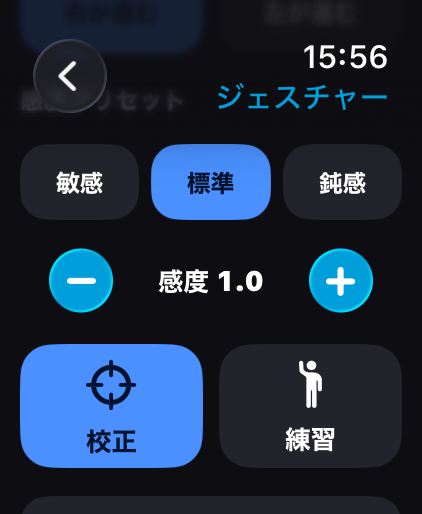
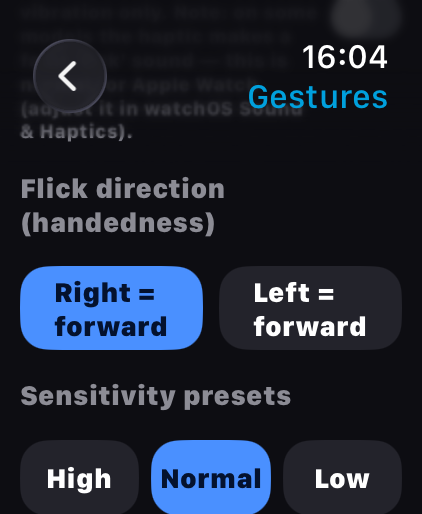
03 / 設定内のジェスチャー画面Gesture settings detail
03 / MAKE IT YOURS
あなたの時間。あなたの所作。細部まで、自分仕様に。Your timing. Your motion. Fine-tune the details.
03画面の設定から、時間の見せ方も、ジェスチャーの反応も調整。登壇前に、自分に合った使い心地へ。Use screen 03 to adjust timing, display, and gesture response. Make the experience your own before taking the stage.
時間と表示を整えるTune timing and display
持ち時間、タイマー時間、文字サイズ・フォント・色、残り時間のアラートなどを調整できます。Adjust talk and timer duration, type size, font, colors, and remaining-time alerts.
校正・感度・練習Calibrate, adjust, rehearse
ジェスチャーの校正と感度調整を行い、練習モードで自分の振りを確認できます。Calibrate your gesture, adjust sensitivity, and check your movement in practice mode.
合図も、会場に合わせるChoose your cues
終了時の振動・点滅・音などを設定。話す環境に合わせて調整できます。Configure vibration, flashes, and sound for the setting you present in.
02 / ONE CONNECTED FLOW
iPhoneでも、プレゼンをコントロール。Presentation control. On your iPhone, too.
Watchとつながる準備の場所。Watchがなくても頼れる、プレゼンのコントロールセンターです。Prepare and connect with Watch, or control your presentation from iPhone alone.
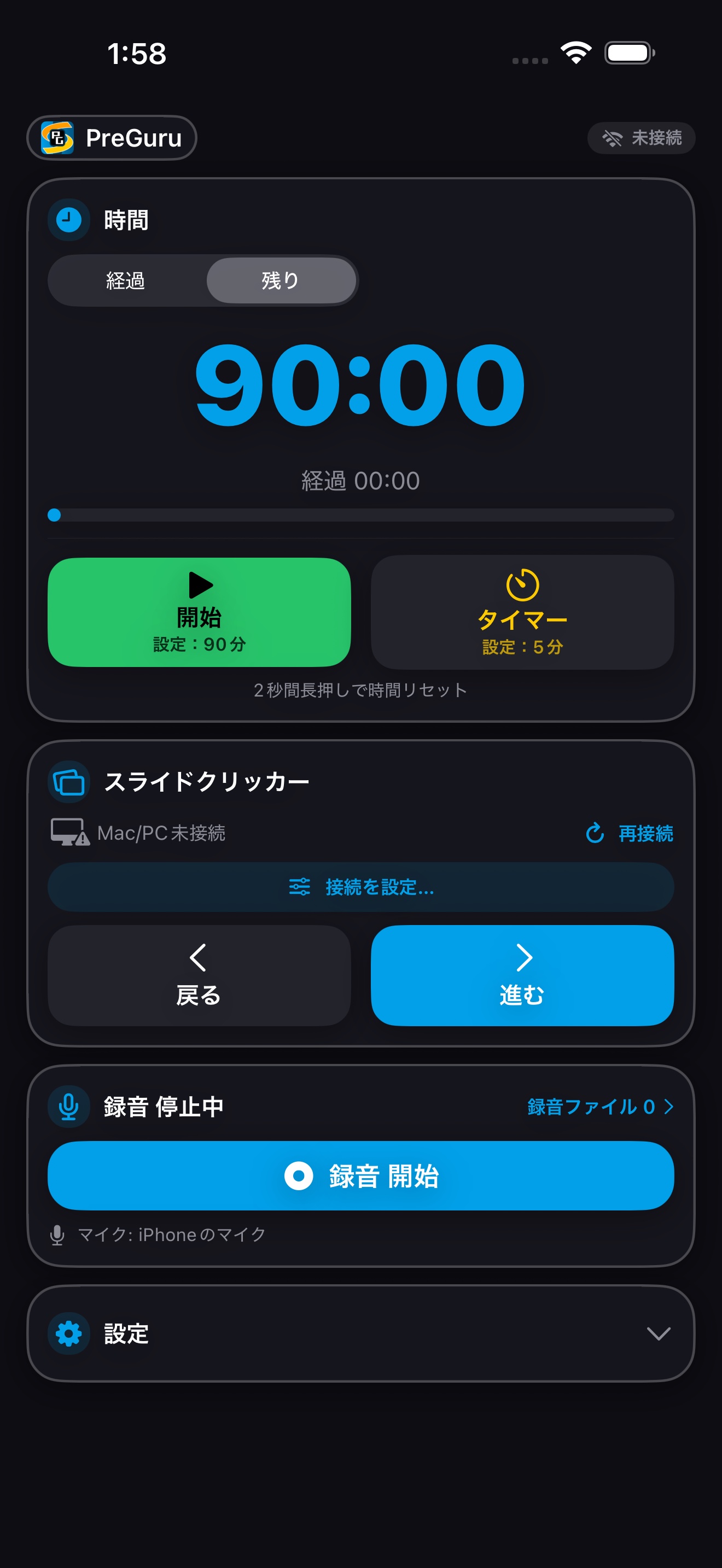
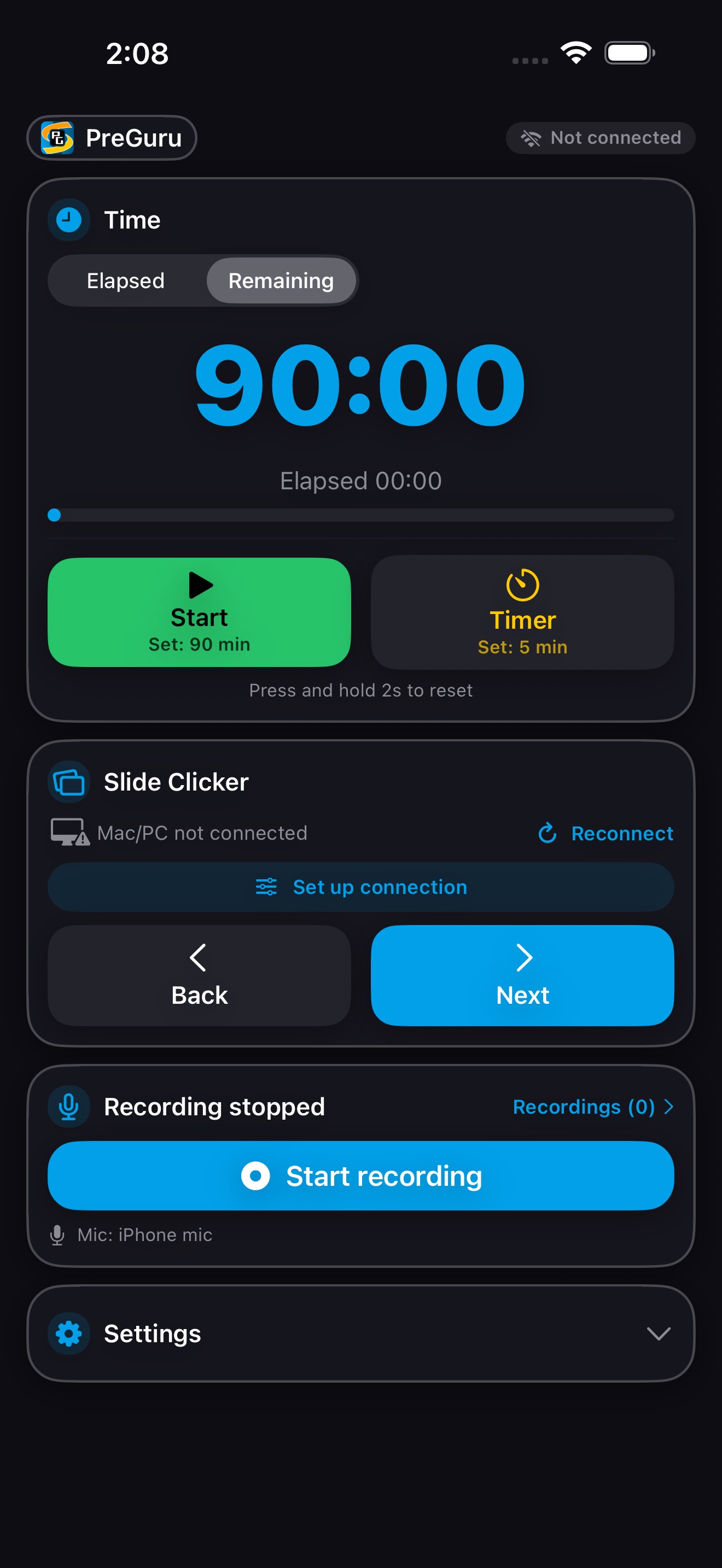
整える。つなぐ。iPhoneだけでも、進められる。Prepare. Connect. Present with iPhone alone.
Watchと時間・操作を連携Stay in sync with Watch
時間・タイマーの設定をWatchへ反映。スライド操作をReceiverへ中継し、Watchからの録音指示も受け取ります。Apply time and timer settings to Watch, relay slide commands to Receiver, and receive recording controls from Watch.
Apple Watchがなくても使えるNo Apple Watch required
iPhoneの画面で時間管理・タイマー・録音を操作。無料Receiverへ接続すれば、スライドの送り・戻しもできます。Manage time, timers, and recording on iPhone. Connect to the free Receiver to advance and return through your slides.
準備は、大きな画面でPrepare on the larger screen
持ち時間、タイマー、通知や表示を設定し、録音ファイルを管理。iPhoneで整えて、Watchで指揮できます。Set timing, timers, notifications and display, and manage recordings. Prepare on iPhone, then conduct from Watch.
エアスワイプはApple Watchの機能です。iPhoneでのスライド操作は画面のボタンを使います。Air Swipe requires Apple Watch. Slide control on iPhone uses on-screen buttons.
02 / ONE CONNECTED FLOW — RECEIVER
そのひと振りを、大きなスクリーンへ。From your wrist to the big screen.
Macに無料のPreGuru Receiverをインストール。iPhoneを経由して、Apple Watchの操作とプレゼンがつながります。Install the free PreGuru Receiver on Mac. Through iPhone, your Apple Watch connects to your presentation.
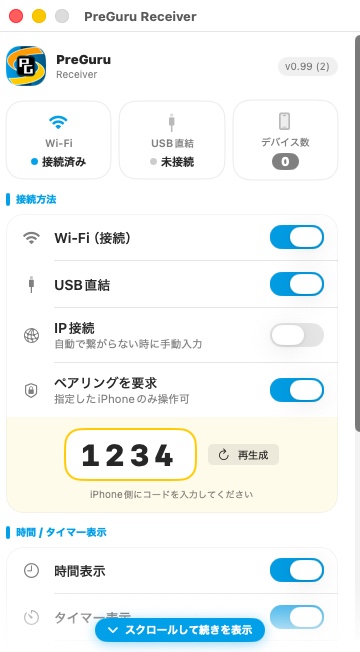
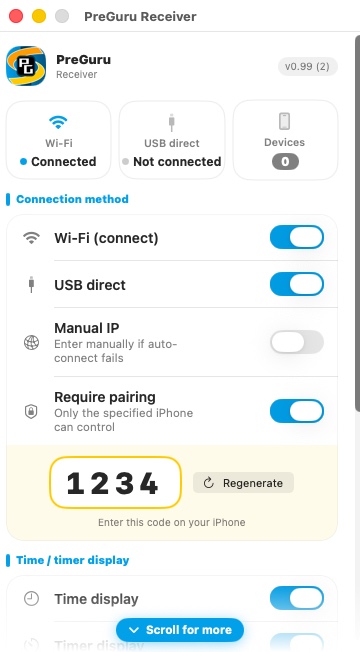
多くのプレゼンソフトに対応。時間/タイマーも表示。Works with most presentation apps. Time and timers, too.
iPhoneからの指示でスライドを送り・戻し。時間とタイマーの情報もReceiverに同期し、Mac側で表示できます。Receive next/back commands from iPhone and display synchronized talk time and timers on your Mac.
大切な本番に、USBという選択肢。For the moments that matter. Connect by USB.
MacとiPhoneはWi-Fiに加え、USB直結にも対応。会場の無線環境に頼らない接続を選べます。Connect iPhone to Mac over Wi-Fi or directly by USB, with an option that does not rely on the venue’s wireless network.
USB接続はMac版の機能です。Windows版はWi-Fi接続です。USB is a Mac feature. Windows uses Wi-Fi.Windows用Receiver(正式版 v1.1.0)もご用意しています。詳細はダウンロードをご覧ください。A Windows Receiver (official v1.1.0) is also available. See Downloads for details.
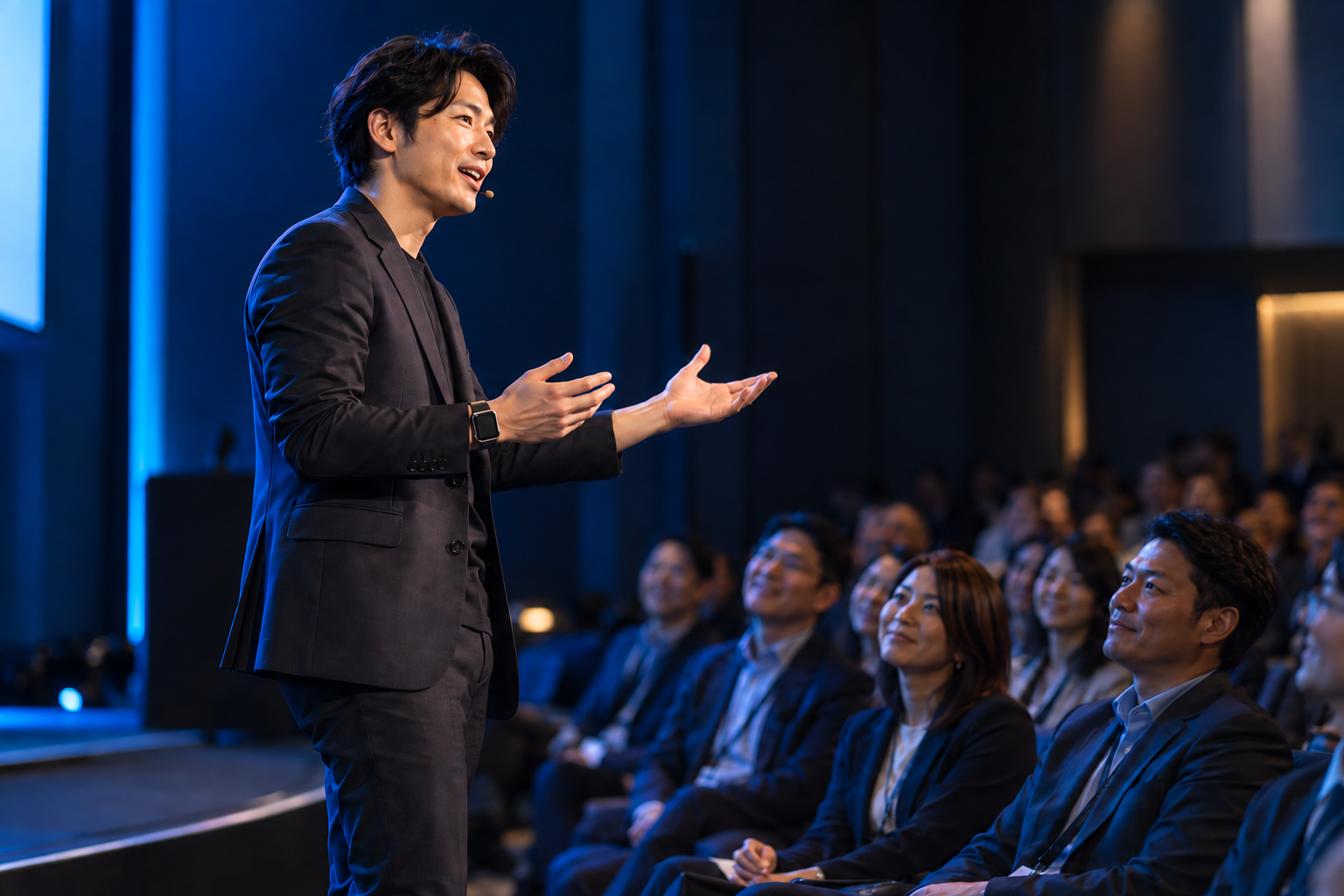
ENCHANT YOUR PRESENTATION.
スライドの先にいる、
人の心を動かそう。Beyond the slides.
Move the people.
あなたの言葉と身振りに、もっと自由を。More freedom in every word and gesture.
03 / READY FOR YOUR STAGE
さぁ、次の登壇から。準備はここで。Starting with your next talk. Get ready here.
動作環境の確認から、導入・サポートまで。必要な項目を選んでください。From device requirements to setup and support. Choose what you need.
お使いのデバイスを確認。System requirements
iPhone
iOS 18.0 以降(iPhone XR・XS 以降)。単体でタイマー・録音・スライド操作が可能。iOS 18.0 or later (iPhone XR / XS or later). Timer, recording, and slide control on its own.
Apple Watch
watchOS 11.0 以降(Series 9 以降・Ultra 2 以降)。アクションボタンは Apple Watch Ultra。watchOS 11.0 or later (Series 9 or later / Ultra 2 or later). Action button on Apple Watch Ultra.
macOS
macOS 14.0 以降(Apple Silicon / Intel)。USB直結にも対応。macOS 14.0 or later (Apple Silicon / Intel). Direct USB supported.
Windows
Windows 10 / 11(64bit)。.NET 8 ランタイム(同梱版は不要)。Windows 10 / 11 (64-bit). .NET 8 runtime (bundled build doesn't need it).
あなたのステージを、準備しよう。Get ready for your next stage.
PreGuru Receiverは、Apple Watch・iPhoneの操作をあなたのMac / PCへ届ける無料アプリです。Mac版は正式リリース。時間・タイマー表示、USB / Wi-Fiの双方向接続、幅広いアプリ対応まで、ビジネスの現場で使い切るために磨き込みました。PreGuru Receiver is the free bridge from Apple Watch and iPhone to your Mac or PC. The Mac edition is our official release, refined for real business rooms with on-screen time, two-way USB/Wi-Fi connection, and broad app compatibility.
iPhone / Apple WatchアプリはApp Storeで近日公開予定(買い切り)。Receiverは無料です。The iPhone / Apple Watch app is coming soon as a one-time purchase. The Receiver is free.iPhone / Apple WatchアプリはApp Storeで販売中(買い切り)。Receiverは無料です。The iPhone / Apple Watch app is on the App Store as a one-time purchase. The Receiver is free.
利用規約(EULA)に同意いただくとダウンロードできます。上のチェックボックスにチェックを入れてください。Please accept the End User License Agreement to download. Tick the checkbox above.
macOS正式版Stable
v1.1 ・ macOS 14.0以降 ・ Apple Silicon / Intel対応 ・ 約1.0MB(.dmg・Apple公証済み)・ USB直結対応 ・ 会場のWi-Fiが無くてもiPhoneと直接つながります。大切な登壇のための、最も信頼できるReceiverです。v1.1 · macOS 14.0 or later · Apple Silicon / Intel · about 1.0MB (.dmg, notarized by Apple) · direct USB. Our most dependable receiver for important moments. Connects directly to the iPhone even without venue Wi-Fi.
Mac版をダウンロードDownload for MacWindows正式版Stable
v1.1.0 ・ Windows 10 / 11(64bit)・ 約48MB(.exeインストーラー / .NET 8 同梱)。トランジスターズ株式会社のAuthenticode証明書で署名済みです。v1.1.0 · Windows 10 / 11 (64-bit) · about 48MB (.exe installer, .NET 8 bundled). Authenticode-signed by transistors Co., Ltd.
Windows版をダウンロードDownload for WindowsiPhone / Apple Watch アプリiPhone / Apple Watch app
PreGuru ・ iOS 18.0以降 / watchOS 11.0以降 ・ Apple Watch版はiPhoneアプリに同梱 ・ App Storeで近日公開(買い切り)PreGuru · iOS 18.0 / watchOS 11.0 or later · Apple Watch app bundled with the iPhone app · coming soon on the App Store (one-time purchase)PreGuru ・ iOS 18.0以降 / watchOS 11.0以降 ・ Apple Watch版はiPhoneアプリに同梱 ・ App Storeで販売中(買い切り)PreGuru · iOS 18.0 / watchOS 11.0 or later · Apple Watch app bundled with the iPhone app · on the App Store (one-time purchase)
はじめかたガイド & AIサポートGetting started & AI support
説明書(PDF)に加え、生成AIがあなたの環境に合わせて伴走サポート。困ったら“AIアシスタント”に聞けます。A PDF manual plus an AI that walks you through setup for your exact device — ask the assistant anytime.
- 01
アプリを用意Get the apps
iPhoneとApple WatchにPreGuruを。プレゼンするMac / Windowsには、無料Receiverをインストール。Get PreGuru on iPhone and Apple Watch, and install the free Receiver on your presentation Mac or Windows PC.
- 02
iPhoneとPCを接続Connect iPhone and computer
同じWi-Fiで接続。MacではUSB直結も選べます。iPhoneがWatchとプレゼンをつなぎます。Connect over the same Wi-Fi, or use a direct USB connection on Mac. iPhone links your Watch to the presentation.
- 03
校正して、ステージへCalibrate. Rehearse. Present.
手首の振りを校正し、練習モードで確認。プレゼンを最前面に開き、実際の接続環境で送り・戻しを試します。Calibrate your wrist movement and use practice mode. Open your presentation in the foreground and check next/back on your actual setup.
本番前の推奨設定(4つ)Four settings we recommend before your talk
Apple Watch本体とiPhoneの「Watch」アプリで行います。PreGuruからは変更できません(watchOSがアプリに変更手段を用意していないためです)。These are set on the Apple Watch itself and in the Watch app on iPhone. PreGuru cannot change them, because watchOS gives apps no way to do so.
⚠️ まず、2つの使い方のどちらかを選んでください。Apple Watch の制約で、「腕を下ろしたまま送る」と「ダブルタップ」は同時に使えません(AssistiveTouch をオンにすると watchOS の「ジェスチャ」がオフになり、ダブルタップが使えなくなるためです)。⚠️ First, choose one of two ways to use it. Because of how the Apple Watch works, “flick with your arm down” and “Double Tap” cannot both be had — turning AssistiveTouch on switches off the watchOS Gestures setting, which is what Double Tap needs.
| A:腕を下ろしたまま送る(おすすめ)A: Flick with your arm down (recommended) | B:ダブルタップを使うB: Keep Double Tap | |
|---|---|---|
| ジェスチャGestures | オフoff | オン(手首フリックは必ずオフ)on (Wrist Flick must be off) |
| AssistiveTouch | オンon | オフoff |
| 手首を下げてスリープSleep on Wrist Down | オフoff | (切っても効きません)(has no effect) |
| できることWhat you get | 腕を下ろしたまま振れる。手首フリックの問題も起きないFlick with your arm down; the Wrist Flick problem does not arise | ダブルタップで素早くオン・オフToggle Air Swipe quickly with Double Tap |
| 代償What it costs | ダブルタップ不可・電池の消耗が増えるNo Double Tap; more battery | 腕を上げて画面が点くまで振れないYou must raise your arm and wait for the screen |
以下の①②は B を選んだ場合の設定です。A を選んだ場合は「ジェスチャ」ごとオフになるため、①(手首フリック)は不要です。③④はどちらでも行ってください。Items 1 and 2 below are for option B. With option A the Gestures setting is off altogether, so item 1 (Wrist Flick) does not apply. Items 3 and 4 are worth doing either way.
-
手首フリックをオフ(いちばん重要)Turn off Wrist Flick (most important)
Apple Watch の 設定 → ジェスチャ → 手首フリック → オフApple Watch: Settings › Gestures › Wrist Flick › off手首を外側へクイッと返すと文字盤に戻る機能で、既定でオンです。これはエアスワイプとほぼ同じ動きなので、振った瞬間にPreGuruから追い出されてしまいます。③を設定してもこの現象は直りません(手首フリックは「自分で文字盤に戻した」とみなされるため)。This returns you to the watch face when you flick your wrist sharply outward, and it is on by default. It is almost the same motion as an Air Swipe, so a flick can throw you straight out of PreGuru. Setting item 3 will not fix this — a wrist flick is treated as you choosing to go back to the watch face yourself.
-
腕を下ろしても眠らせないStop it sleeping when your arm is down
iPhone の「Watch」→ アクセシビリティ → AssistiveTouch → ①「AssistiveTouch」を オン → ②「手首を下げているときにスリープ」を オフiPhone Watch app: Accessibility › AssistiveTouch › (1) turn AssistiveTouch ON › (2) turn “Sleep on Wrist Down” OFF⚠️ ①を必ず先に行ってください。AssistiveTouch がオフのままだと、②のスイッチは操作できるのに、まったく効きません。設定したつもりになりやすい箇所です。
腕を下ろすと Apple Watch はアプリごと止め、その間の振りは拾えません。この設定をすると止まらなくなり、腕を上げてそのまま振れます。電池の消耗は早くなるので、プレゼンの間だけの使い分けがおすすめです。⚠️ Do step 1 first. While AssistiveTouch is off, the switch in step 2 can still be toggled but has no effect at all — it is very easy to believe you have set it when you have not.
When you lower your arm the Apple Watch stops the app itself and flicks made then are not picked up. With this set it keeps running, so you can raise your arm and flick straight away. It does use more battery, so consider turning it on only for the talk. -
文字盤に戻る時間を延ばすExtend the return-to-clock time
Apple Watch の 設定 → 一般 → 時計に戻す → PreGuru → 「1時間後」Apple Watch: Settings › General › Return to Clock › PreGuru › After 1 hour何も操作しないまま時間が経ったときの自動復帰を防ぎます。This prevents the automatic return that happens after a while with no interaction.
-
画面をすぐ暗くしないDo not let the screen dim so quickly
Apple Watch の 設定 → 画面表示と明るさ → スリープ解除時間 → 「70秒」Apple Watch: Settings › Display & Brightness › Wake Duration › Wake for 70 Seconds既定の15秒だと、腕を少し傾けただけで暗くなります。70秒にすると、一度腕を上げればそのまま送り続けられます。At the default 15 seconds it dims as soon as you tilt your wrist. At 70 seconds, one raise keeps you going.
それでも眠ったら:文字盤を指で軽く1回「トン」。触れてから70秒は起きたままで、表示は変わりません。手首に「下がる振動」が来たら、が合図です。大きい時間の経過/残りは2回タップ、エアスワイプのON/OFFは上のチップを3回タップです(v1.0.2 以降)。If it still falls asleep: tap the watch face lightly once. It stays awake for 70 seconds after a touch and the display does not change. The falling buzz on your wrist is your cue. Double-tap the big time to switch elapsed/remaining; triple-tap the chip at the top for Air Swipe ON/OFF (v1.0.2 and later).
インストール&操作 説明書Manual (PDF)
インストール・接続・操作・困ったときまでの全手順(PDF)。Full setup, connection, operation, and troubleshooting (PDF).
PDF説明書をダウンロードDownload PDF manualAIサポート(生成AI用)AI support
.md をダウンロードして ChatGPT / Claude 等に添付。あなた専用の“AI説明員”が、対話でインストール・操作をサポートします。Download the .md and attach it to ChatGPT / Claude — your personal AI assistant guides setup and operation in a chat.
AIサポート .md をダウンロードDownload AI support (.md)よくある質問Frequently asked questions
お問い合わせの前に、まずこちらで解決するかご確認ください。検索・カテゴリーで絞り込めます。Before contacting us, check here first. Filter by keyword search or category.
該当する質問が見つかりませんでした。別のキーワードでお試しください。No matching questions. Please try another keyword.
解決しないときはStill need help? サポートページへVisit support
開発者から、あなたへ。A message from the developer
これからのプレゼンテーションは、AIと構想を練り、AIがスライドを描く時代へ進みます。それでも——聴衆に“伝え”、その心を“動かし”、次の“行動”を引き出す。この最も大切な仕事は、あなたにしかできません。人に残された、いちばん人間らしい仕事です。Presentations are entering an era where you shape the ideas with AI, and AI draws the slides. Even then — reaching your audience, moving them, and drawing out their next action — this most important work is yours alone. It is the most human work left to us.
PreGuruは、プレゼンのリモコンではありません。プレゼンの設計と、聴衆が魅了される瞬間との間に欠けていたレイヤーです。PreGuru is not a presentation remote. PreGuru is the missing layer between presentation design and audience enchantment.
PreGuruは、その一番大切な仕事に、あなたが没頭できるように生まれました。時間、スライド、録音、そして複数のデバイスをまたぐ確実な連携までをApple Watchから指揮(オーケストレーション)する。あなたは機器操作から解き放たれ、視線と言葉をまっすぐ聴衆に向け、そしてあなたのプレゼンで彼らを魅了できる。優れたプレゼンテーションは、聴衆を動かし、ビジネスを動かします。ぜひ PreGuruをパートナーに、あなたのプレゼンテーションに磨きをかけ、その先にある成功を確実に掴んでください。PreGuru was born so that you can immerse yourself in that work. Timing, slides, recording, and dependable coordination across several devices — all orchestrated from your Apple Watch. Freed from operating equipment, you turn your eyes and your words straight to the audience, and your presentation captivates them. A great presentation moves an audience, and moves a business. Make PreGuru your partner, refine every talk, and take firm hold of the success that lies beyond it.